

UKG (UltiPro) is the online-based Human Resources and Payroll software used by Mt. Rose Ski Tahoe. As an employee, you can access your own account in UKG and view your employment and payroll information, as well as update personal data such as contact info, and W-4 tax withholding, and add/change your direct deposit account.
1. INSTALL: “UKG PRO” APP (download app in your app store)
UKG is merging their apps and we now must use the “UKG Pro” App.

2. LOGIN INFORMATION:
Company Code: MTROSE
Username: MTRSE+5 Digit Employee Number
Password: Current Password
3. INSTALL: “UKG READY” APP

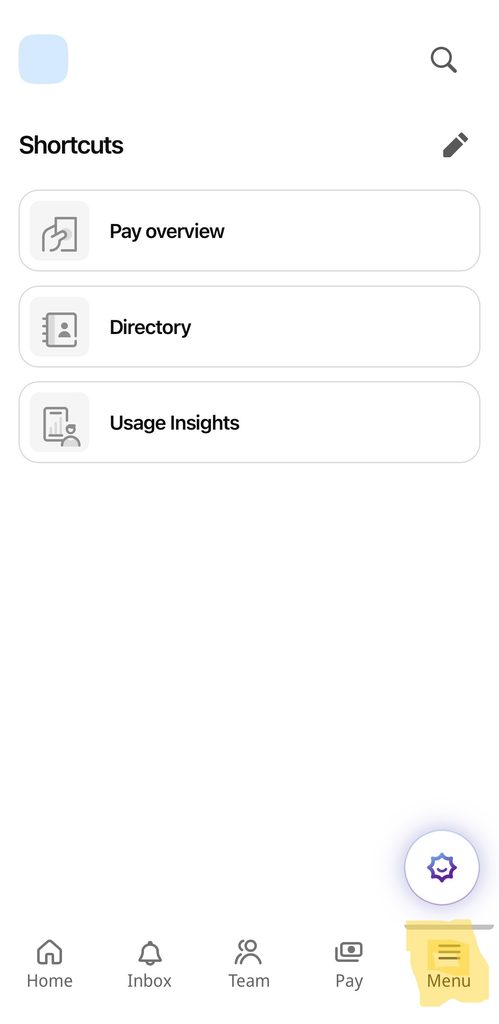
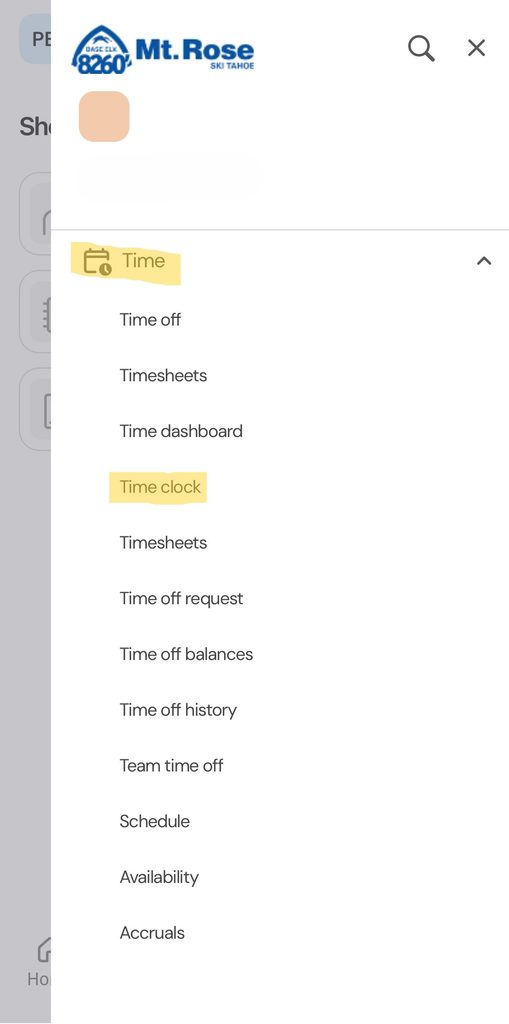
4. ON UKG PRO, NAVIGATE TO MENU > TIME > TIME CLOCK This should reroute your to UKG Ready and allow you to log in. Your log in info will be the same as above. Do not try to log into UKG Ready directly–you have to go through UKG Pro first for the app to recognize Mt. Rose as your company. The UKG Ready app is where you will clock in/out, view your timesheets, and submit punch change requests.
If the app is down, please log into UKG through the web version (this guide can be found on the right side of this web page).
For instructions on how to log in and view/update your information in UKG, click the links below.
Instructions on Accessing Your Employee Account in UKG
How to Add Your Direct Deposit Account on UKG
Instructions on Resetting your UKG Password
For Benefitted Employees:
How to Request PTO and Vacation via UKG
For Supervisors:
Re-Activating Furloughed Employees
Managers’ Guide to Time Management
Managers’ Guide to Recruiting
Scheduling